For riders, instructors, organisers and kids
Draw your own course. See the distances right away.
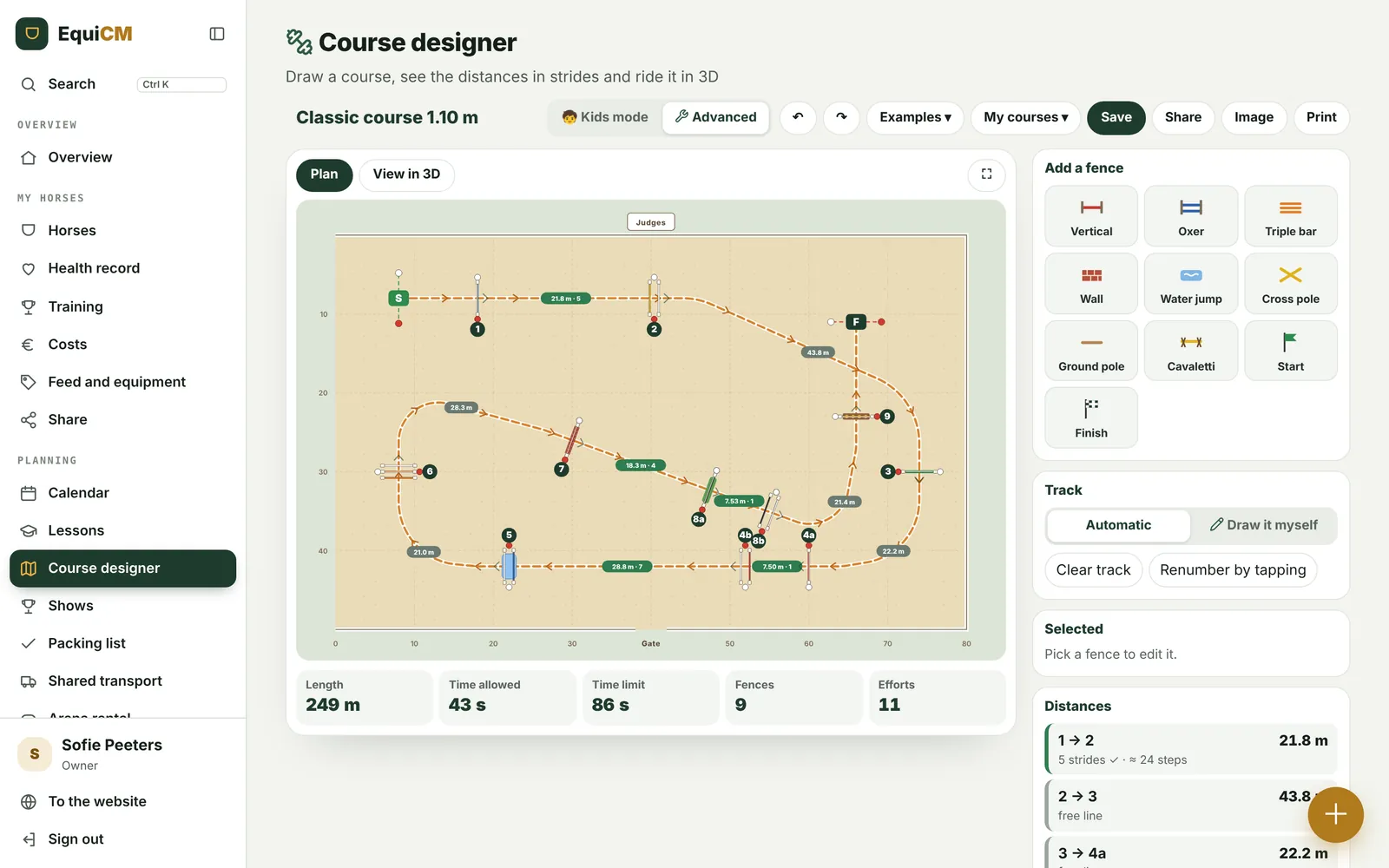
Put fences in the arena, draw the line with your finger and EquiCM shows every distance in metres, strides and steps. A course check looks over it by the rules of course design, and in 3D you ride the course yourself, from the saddle.
Try it here
The course designer.
Pick an example or start with an empty arena. Drag fences, turn them with the orange handle and choose automatic or draw it yourself. Your course stays saved in this browser. In the app you save them in your account.
Distances are measured along the track, from the back of one fence to the front of the next. Keyboard shortcuts: R rotates, the arrows move, Delete removes, Ctrl+Z undoes.
Distances
How many strides is that?
Choose horse or pony and the number of strides. You see the right distance straight away, and how many steps you take when you walk the course.
| Strides | Distance | Average |
|---|---|---|
| 1 (combination) | 7,50 – 8,00 | 7,70 |
| 2 (combination) | 10,50 – 11,00 | 10,80 |
| 3 | 14,30 – 15,00 | 14,65 |
| 4 | 17,90 – 18,60 | 18,25 |
| 5 | 21,50 – 22,50 | 22,00 |
| 6 | 25,00 – 26,00 | 25,50 |
| 7 | 28,50 – 29,50 | 29,00 |
Towards an oxer you build 10 to 20 cm shorter than towards a vertical. For ponies every stride is 30 to 50 cm shorter. Uphill, deep going and jumping away from the gate shorten the canter; downhill, springy going and jumping towards the gate lengthen it.
The rules
This is how you build a good course.
The course check in the designer checks these points for you. Tap a card for more.
🚩Red flag right, white left
Every fence has a red flag on the right and a white one on the left, seen in the jumping direction. Passing on the wrong side of a flag means faults or elimination.
🏁Start and finish
The start and finish lines are 6 to 15 metres from the first and last fence, as square as possible to the rider's track. If in doubt, give them more room.
⏱️Speed and time
Usually 350 metres per minute, 300 m/min for horses under 1.05 m and ponies under 0.80 m. The time allowed is the length divided by the speed; the time limit is double that.
📏Measuring the length
Measure with a wheel along the track a good rider takes, with wide turns. The designer does it automatically, even if you draw the line yourself.
↪️Wide turns
A turn follows at least a 20-metre circle. After landing and before the next fence the horse has at least three straight strides, especially after a 90-degree turn.
🔄Change of rein
With 8 to 10 fences you change the rein two or three times. About half the fences are on the left rein, the other half on the right.
👋An inviting first fence
The first one or two fences face the gate. They are open and simple, without heavy filler, and easy to jump on either rein.
🔗Combinations
A combination comes from fence 4 on, ideally towards the gate and after a line. Vertical to vertical is easiest, oxer to oxer better not. Filler only in the first element, and no triple bar in a combination.
📐Oxers and triple bars
An oxer is about as wide as it is high; in lower classes you build it ascending. Triple bars from 1.00 m. The back poles always sit on safety cups that release.
〰️Ground line
The ground line is low and on the take-off side, never behind the fence. It helps horse and rider judge the take-off.
💧Water and liverpool
Teach a young horse water under a fence first: narrow at low heights, ideally in the second half of the course and towards the gate.
🏆Jump-off
At least six fences, a combination counts as one. Shape and colour of the fences stay the same, and the distance in a combination doesn't change.
Fences
Which fence for what?
Tap a fence to put it straight into the course designer.
Colours
This is how a horse sees your fence.
Horses mostly see blue and yellow. Red and green become a greyish brown for them, just like the sand. Switch between human and horse and pick the colours with the most contrast.
What helps
- White, yellow and light blue stand out most for a horse, especially against sand or grass.
- Red and green almost disappear into the ground: always combine them with white.
- Contrast between the top pole, the filler and the ground helps the horse choose its take-off.
- Fluorescent orange looks striking to us, but is one of the least visible colours for a horse.
Based on research into horse vision at the University of Exeter (2020).
For kids
"Dad, can I draw my own course?"
Of course. In kids mode the buttons are big and you draw the line with your finger. You see how many strides and how many steps there are between two fences, and stars tell how good your course is.
Place fences
Tap cross, straight jump, little wall or water. Drag them wherever you like.
Draw your line
Draw with your finger from start to finish. The fences get a number by themselves.
Ride it in 3D
Look between your pony's ears and ride your own course.
In the app
Save and share your course.
In the EquiCM app you save all your courses in your account, and share them with your stable, your instructor or your pupils.
Questions
What people often ask.
Can I use this for a real show?
The course check follows the general course-design guidelines (FEI and national federations). Your show's rules and the official course designer always have the final say.
How does EquiCM measure a distance?
Along the horse's track, from the back of one fence to the front of the next. That's how a course designer measures with his wheel too.
What does 'half stride' mean?
The distance falls between two whole strides. The rider then has to hold or push on. That can be a deliberate choice, but in lower classes you'd rather avoid it.
Does it work on a tablet and phone?
Yes. You draw with your finger, and the 3D works in any recent browser.
Can I share my course?
Tap Share: you get a link to send via WhatsApp or email. Whoever opens it sees your course right away. With Image and Print you make a course plan for the gate.
Where is my course saved?
On the website in this browser, on this device. In the app in your EquiCM account, so you find them everywhere.
Get started
Try it yourself in the demo app.
Open the demo app with a full sample stable, or make your own profile card for free. Professionals use EquiCM for free.
All features